


看截的图,,,
0

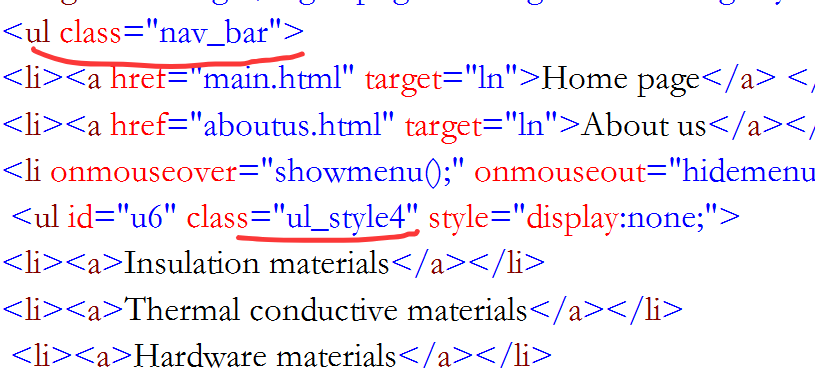



最佳答案
0
你截图啥也看不出 还不如你直接把代码丢给ai检测一下
奖励园豆:5
怎么操作?
问了ai 没什么用
@gzjiuying: 你检测样式有没有被顶替 或者你给代码都发出来
@摸鱼w: 其实是这样,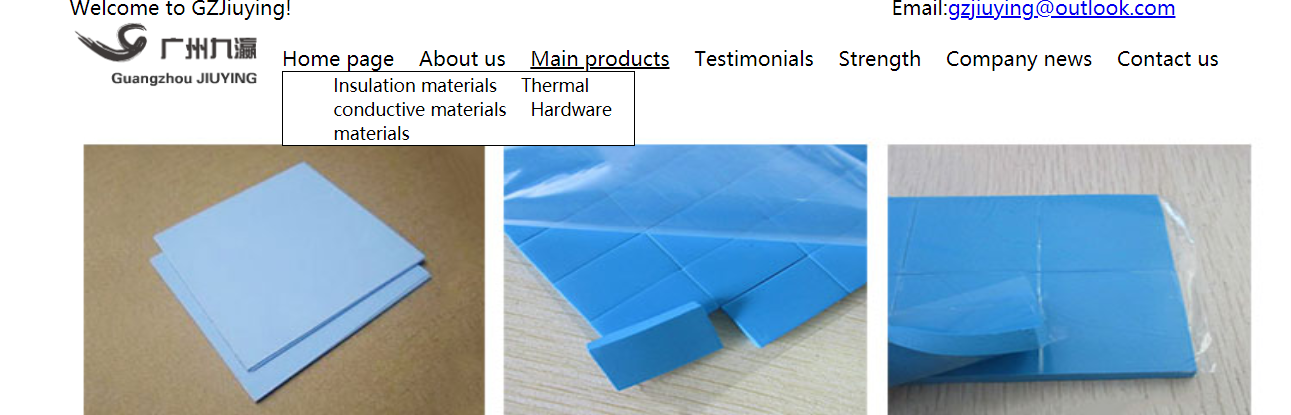
子菜单的样式和上级菜单一样,我加了 list-style-type: circle 还是一样
其他回答(3)
0
你要不贴出来代码吧,截图复制不了源码
其实是这样,
子菜单的样式和上级菜单一样,我加了 list-style-type: circle 还是一样
@gzjiuying: 你有把display:none 拿掉吗?拿掉应该就OK了
<!DOCTYPE html>
<html lang="en">
<head>
<meta charset="UTF-8">
<meta name="viewport" content="width=device-width, initial-scale=1.0">
<title>Document</title>
</head>
<style>
.nav_bar li{
margin-right: 10px;
}
.ul_style4{
list-style-type: disc;
}
</style>
<body>
<ul class="nav_bar">
<li>第一层项目0</li>
<li>第一层项目1
<ul class="ul_style4">
<li>第二层项目1.1</li>
<li>第二层项目1.2
<ul>
<li>第三层项目1.2.1</li>
<li>第三层项目1.2.2</li>
</ul>
</li>
<li>第二层项目1.3</li>
</ul>
</li>
<li>第一层项目2
<ul>
<li>第二层项目2.1</li>
<li>第二层项目2.2</li>
</ul>
</li>
<li>第一层项目3</li>
</ul>
</body>
</html>
@人间春风意: 为什么要去掉 display ?
@人间春风意: 去掉不行的
@人间春风意: 图片是鼠标在上面显示的 ,问题是子菜单每个项前面没有 circle
@gzjiuying:你的问题不是 ulstyle4 设定list-style-type 为 disc 不生效吗?你把你的问题抽出来,做一个最简单的 html 源码发出来
@人间春风意:
<%@ Page Language="C#" AutoEventWireup="true" CodeFile="Default.aspx.cs" Inherits="_Default" culture="auto" meta:resourcekey="PageResource1" uiculture="auto" %>
<!DOCTYPE html PUBLIC "-//W3C//DTD XHTML 1.0 Transitional//EN" "http://www.w3.org/TR/xhtml1/DTD/xhtml1-transitional.dtd">
<html xmlns="http://www.w3.org/1999/xhtml">
<head id="Head1" runat="server">
<title>GZJiuying</title>
<link href="StyleSheet.css" rel="stylesheet" type="text/css" />
<style type="text/css">
</style>
</head>
<body>
<form id="form1" runat="server">
<div class="header">
Welcome to GZJiuying!<span class="span0">Email:<a href="mailto:gzjiuying@outlook.com">gzjiuying@outlook.com</a></span>
</div>
<div class="div0">
<img src="images/logo1.png" alt="logo" class="img_style0"/>
<ul class="nav_bar">
<li><a href="main.html" target="ln">Home page</a> </li>
<li><a href="aboutus.html" target="ln">About us</a></li>
<li onmouseover="showmenu();" onmouseout="hidemenu();" ><a>Main products</a>
<ul id="u6" class="ul_style4" style="display:none;">
<li><a>Insulation materials</a></li>
<li><a>Thermal conductive materials</a></li>
<li><a>Hardware materials</a></li>
</ul>
</li>
<li><a>Testimonials</a></li>
<li><a>Strength</a></li>
<li><a>Company news</a></li>
<li><a>Contact us</a></li>
</ul>
</div>
</body>
</html>
css:
body {
}
.header
{
width:960px;
height:19px;
text-align:left;
margin:auto;
background-color:Transparent;
}
.span0
{
margin-left:480px;
}
.img_style0
{
height: 57px;
width: 152px;
}
.nav_bar
{
list-style-type:none;
font-size:16px;
width: 750px;
height:22px;
margin-top:-35px;
margin-left:170px;
padding:0;
}
.ul_style0
{
	list-style-type:none;
	   font-size:16px;

	   text-align:center;
	   margin:auto;
}
  .ul_style1
{
	list-style-type:none;
 font-size:14px;

	   text-align:left;
	   margin:auto;
}
.ul_style2
{
list-style-type:hebrew;
width:260px;
font-size:14px;
font-weight:bold;
position:absolute;
cursor:pointer;
}
.ul_style3
{
list-style-type:circle;
font-size:14px;
  margin :auto;
  margin-left:-25px;
  cursor:pointer;
}
.ul_style4
{
 list-style-type:circle;
 font-size:14px;
 width:240px;
 border:1px solid #000;
 cursor:pointer;
 z-index:1;
 background-color:White;
 position:absolute;
}
.nav_bar li
{
display:inline;
margin-right:15px;
}
.nav_bar li:last-child
{
margin-right:0;
}
.nav_bar li a:hover
{
text-decoration:underline;
}
.nav_bar li a
{
text-decoration:none;
color:inherit;
}
.div0
{
text-align:left;
margin:auto;
width:960px;
}
.div1
{
width:260px;
height:400px;
float:left;
border:1px solid #000;
text-align:left;
margin-top:5px;
}
.div2
{
width:690px;
height:400px;
border:1px solid #000;
margin-left:5px;
margin-top:5px;
float:left;
}
.div4
{
text-align:center;
margin:auto;
width:960px;
height:405px;
}
.div3
{
text-align:center;
margin:auto;
width:960px;
height:22px;
border:1px solid #000;
clear:both;
margin-top:5px;
margin-bottom:5px;
}
.slideshow-container
{
position: relative;
text-align:center;
margin:auto;
width: 960px;
}
.slide
{
display:none;
}
@gzjiuying: 加个css
.ul_style4 li {
display: list-item;
}
@人间春风意: 弄好了?
@gzjiuying: 我本地好了,
@人间春风意: 还是一样的
@gzjiuying: 那估计就是环境不一样吧,那我就不知道了
@人间春风意: 截个图看下你的
@gzjiuying:
把你的代码改成html验证的,代码如下,你想看截图,自己看一下好了
<!DOCTYPE html
PUBLIC "-//W3C//DTD XHTML 1.0 Transitional//EN" "http://www.w3.org/TR/xhtml1/DTD/xhtml1-transitional.dtd">
<html xmlns="http://www.w3.org/1999/xhtml">
<head>
<title>GZJiuying</title>
<style type="text/css">
    body {}

    .header {
        width: 960px;
        height: 19px;
        text-align: left;
        margin: auto;
        background-color: Transparent;
    }

    .span0 {
        margin-left: 480px;
    }

    .img_style0 {
        height: 57px;
        width: 152px;
    }

    .nav_bar {
        list-style-type: none;
        font-size: 16px;
        width: 750px;
        height: 22px;
        margin-top: -35px;
        margin-left: 170px;
        padding: 0;
    }

    .ul_style0 {
        list-style-type: none;
        font-size: 16px;

        text-align: center;
        margin: auto;
    }

    .ul_style1 {
        list-style-type: none;
        font-size: 14px;

        text-align: left;
        margin: auto;
    }

    .ul_style2 {
        list-style-type: hebrew;
        width: 260px;
        font-size: 14px;
        font-weight: bold;
        position: absolute;
        cursor: pointer;
    }

    .ul_style3 {
        list-style-type: circle;
        font-size: 14px;

        margin: auto;
        margin-left: -25px;
        cursor: pointer;
    }

    .ul_style4 {
        list-style-type: circle;
        font-size: 14px;
        width: 240px;
        border: 1px solid #000;
        cursor: pointer;
        z-index: 1;
        background-color: White;
        position: absolute;
    }

    .nav_bar li {
        display: inline;
        margin-right: 15px;
    }

    .nav_bar li:last-child {
        margin-right: 0;
    }

    .nav_bar li a:hover {
        text-decoration: underline;
    }

    .nav_bar li a {
        text-decoration: none;
        color: inherit;
    }

    .div0 {
        text-align: left;
        margin: auto;
        width: 960px;
    }

    .div1 {
        width: 260px;
        height: 400px;
        float: left;
        border: 1px solid #000;
        text-align: left;
        margin-top: 5px;
    }

    .div2 {
        width: 690px;
        height: 400px;
        border: 1px solid #000;
        margin-left: 5px;
        margin-top: 5px;

        float: left;
    }

    .div4 {
        text-align: center;
        margin: auto;
        width: 960px;
        height: 405px;
    }

    .div3 {
        text-align: center;
        margin: auto;
        width: 960px;
        height: 22px;
        border: 1px solid #000;
        clear: both;
        margin-top: 5px;
        margin-bottom: 5px;
    }

    .slideshow-container {
        position: relative;
        text-align: center;
        margin: auto;
        width: 960px;
    }

    .slide {
        display: none;
    }
    .ul_style4 li {
display: list-item; /* 确保列表项正常显示 */
margin: 5px 0; /* 添加上下边距 */
}
</style>
<script type="text/javascript">
function showmenu() {
document.getElementById("u6").style.display = "block";
}
    function hidemenu() {
        document.getElementById("u6").style.display = "none";
    }
</script>
</head>
<body>
<form id="form1">
<div class="header">
Welcome to GZJiuying!<span class="span0">Email:<a
href="mailto:gzjiuying@outlook.com">gzjiuying@outlook.com</a></span>
</div>
<div class="div0">
<img src="images/logo1.png" alt="logo" class="img_style0" />
<ul class="nav_bar">
<li><a href="main.html" target="ln">Home page</a> </li>
<li><a href="aboutus.html" target="ln">About us</a></li>
<li onmouseover="showmenu();" onmouseout="hidemenu();"><a>Main products</a>
<ul id="u6" class="ul_style4" style="display:none;">
<li><a>Insulation materials</a></li>
<li><a>Thermal conductive materials</a></li>
<li><a>Hardware materials</a></li>
</ul>
</li>
<li><a>Testimonials</a></li>
<li><a>Strength</a></li>
<li><a>Company news</a></li>
<li><a>Contact us</a></li>
</ul>
</div>
</form>
</body>
</html>
@人间春风意: 截个图看看
0
用360极速浏览器X,按F12打开调试模式看看下原因
不知道怎么弄
0
已经解决了!
